
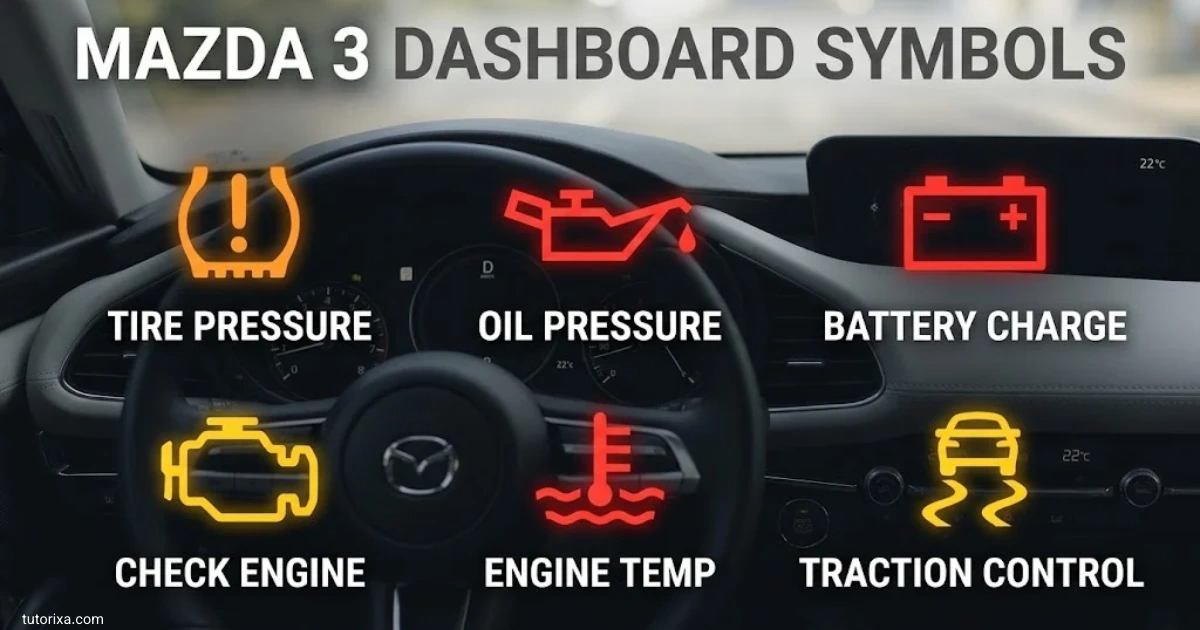
The Mazda 3 dashboard symbols and meanings can help you understand what your car is telling you while driving. Some symbols show that a feature is working, while others warn you about problems with the engine, brakes, battery, tires, or other vehicle systems. Knowing the difference can help you decide what needs attention.
Mazda 3 dashboard lights can vary by model year, trim level, and equipment. A 2004 Mazda 3, for example, may display different indicators from a 2018 or 2019 model. The color, shape, and flashing behavior of a warning light can also affect what you should do next.
This guide explains common Mazda 3 dashboard symbols, instrument cluster indicators, and the exclamation-point warning. It also covers the 2004, 2006, 2011, 2012, 2013, 2015, 2016, 2017, 2018, and 2019 models so you can find information relevant to your vehicle. For an exact diagnosis, always check the owner’s manual for your model year.
Mazda 3 Dashboard Symbols And Meanings
Mazda 3 dashboard symbols provide information about your vehicle’s condition and operating systems. Some are routine indicators, while others require immediate attention.
The symbols below are simplified text descriptions rather than exact dashboard artwork. Your vehicle’s displayed icon may look slightly different.
| Symbol or appearance | Name | Meaning and recommended action |
| Oil can, usually red | Engine oil pressure | Stop safely and switch off the engine. Check the oil level only when safe. Low oil pressure can cause severe engine damage. |
| Battery outline, red | Charging system | The battery may not be charging correctly. Stop somewhere safe and arrange an inspection. |
| Engine outline, amber | Check engine | The engine or emissions system has detected a fault. Arrange a diagnostic scan. If the light flashes, reduce engine load and stop if the engine runs roughly or loses power. |
| Circle with an exclamation mark | Brake system | Check that the parking brake is fully released. If the light remains on, stop safely and check the manual. Low brake fluid or a braking fault may be involved. |
| ABS | Anti-lock braking system | The ABS may have a fault. Normal braking may remain available, but anti-lock protection could be unavailable. |
| Tire-shaped outline with ! | Tire pressure monitoring system | One or more tires may have incorrect pressure. Check all tires when cold and inflate them to the recommended pressure. |
| Thermometer over wavy lines | Engine coolant temperature | A high-temperature warning can indicate overheating. Stop safely and let the engine cool. Never open a hot cooling-system cap. |
| Person with a circle in front | Airbag system | The airbag or seat-belt pretensioner system may need inspection. |
| Person wearing a belt | Seat belt | A seat belt is unfastened or the system has detected an unfastened occupant’s belt. |
| Fuel pump | Low fuel | Refuel soon. Do not rely on the remaining range estimate alone. |
| Car with a door open | Door-ajar warning | Check that all doors, the trunk, or the liftgate are fully closed. |
| Windscreen with spray | Washer fluid | Refill the washer-fluid reservoir if your model has this indicator. |
| AT or a transmission-related warning | Automatic transmission | The transmission system may have detected a fault. Follow the manual and seek service. |
| Steering wheel with an exclamation mark | Power steering | Power steering assistance may be reduced or unavailable. Stop safely if steering becomes difficult. |
| Wrench symbol | Maintenance reminder | Scheduled maintenance may be due. Check the maintenance display or service schedule. |
| Blue headlamp with straight rays | High-beam indicator | The high-beam headlights are on. Switch to low beams when appropriate for other road users. |
| Green arrows | Turn signals | The turn signals or hazard indicators are operating. Rapid flashing can indicate a failed bulb or another signal-system issue. |
| Car with skid marks | Traction or stability control | The system may be actively correcting wheel slip. If the light stays on, the system may be disabled or faulty. |
Mazda’s official owner’s manuals list warnings such as oil pressure, charging system, brakes, ABS, engine temperature, airbags, tire pressure, and low fuel. Available indicators depend on the model and equipment.
What Dashboard Light Colors Mean
- Red: Usually indicates a serious warning or a condition that requires prompt action. Stop as soon as it is safe when the symbol indicates a critical fault.
- Amber or yellow: Signals a problem, caution, or system limitation that needs attention.
- Green: Usually confirms that a feature, such as a turn signal, is operating.
- Blue: Commonly indicates that the high-beam headlights are on.
Color alone does not provide a complete diagnosis. Read any accompanying message and consult the correct owner’s manual.
What To Do When A Warning Light Appears
- Identify the symbol and its color.
- Check whether it is steady or flashing.
- Read any message on the information display.
- Stop safely if the warning indicates overheating, low oil pressure, a serious brake problem, or another critical condition.
- Consult the owner’s manual and arrange a professional diagnosis when needed.
Many lights briefly illuminate when the ignition is switched on as part of a system check. A light that stays on or returns while driving may require further attention.
Mazda 3 Dashboard Symbols Explained
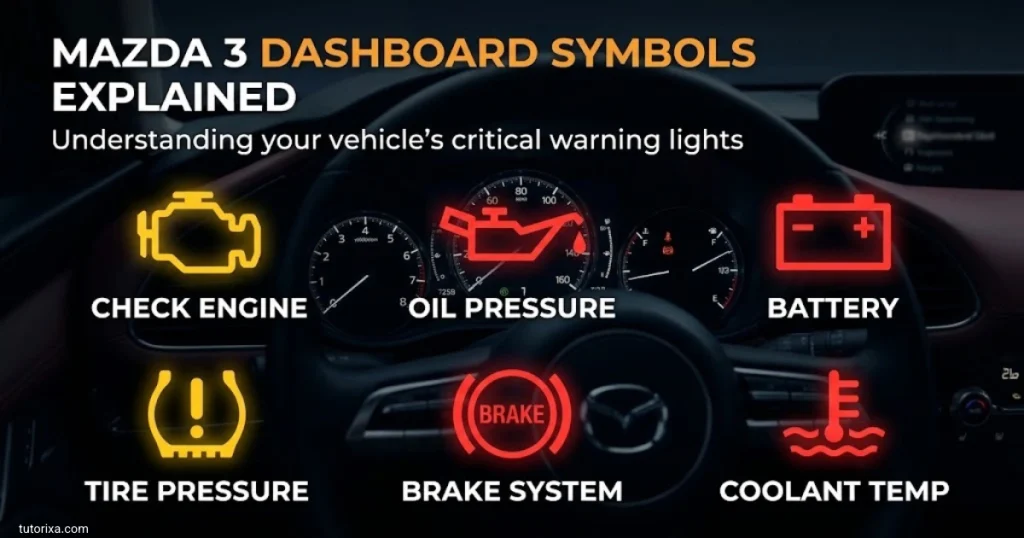
Mazda 3 dashboard symbols fall into several categories. Understanding these categories makes it easier to tell whether a light is simply showing that a feature is active or warning you about a fault.
Engine And Mechanical Warning Symbols
The check engine light, oil pressure warning, coolant temperature warning, and transmission warning relate to the engine or its supporting systems. Their causes can range from a minor issue to a problem that requires immediate attention.
For example, a steady amber check engine light often allows you to arrange a prompt diagnostic check if the car is running normally. A red oil pressure warning is different: stop safely and switch off the engine as soon as possible.
Braking And Safety Symbols
Brake system, ABS, airbag, and seat belt indicators help you identify potential safety issues. A brake warning that remains illuminated after releasing the parking brake should never be ignored. If braking feels unusual, avoid continuing to drive.
An ABS warning does not necessarily mean the regular brakes have stopped working, but the anti-lock function may be unavailable. Have the system checked promptly.
Driver Assistance And Convenience Symbols
Depending on the model year and trim, your Mazda 3 may have indicators for cruise control, lane departure warning, blind-spot monitoring, high-beam control, or traction control.
Some of these lights appear because a feature is active. Others indicate that a feature is unavailable or has detected a fault. Check the dashboard message and your owner’s manual before deciding what action is needed.
Instrument Cluster Mazda 3 Dashboard Symbols
The instrument cluster is the display directly in front of the driver. It typically contains the speedometer, engine-speed gauge or tachometer, fuel gauge, warning lights, and information display. Its exact layout varies between Mazda 3 generations.
Here are the main indicators and displays you may find in the cluster.
| Indicator or display | What it tells you |
| Speedometer | Shows your current driving speed. |
| Tachometer | Displays engine speed in revolutions per minute. |
| Fuel gauge | Shows the approximate amount of fuel remaining. |
| Temperature gauge or warning | Indicates engine temperature or warns of overheating. |
| Odometer | Records the vehicle’s total distance traveled. |
| Trip meter | Tracks distance for an individual journey. |
| Maintenance wrench | Indicates that scheduled maintenance may be due. |
| Master warning symbol | Alerts you to a warning that may require checking the information display. |
| Security indicator | Shows the status of the vehicle’s security or immobilizer system. |
| Key warning | May indicate a key-detection or keyless-entry problem, depending on the model. |
| Cruise control indicator | Shows when cruise control or a related driving feature is active. |
| Stability control indicator | May flash when the system intervenes or remain illuminated if a fault is detected. |
Why Your Instrument Cluster May Look Different
Earlier Mazda 3 models generally use simpler instrument displays, while later models can include additional information screens and driver-assistance indicators.
Some symbols are fitted only to selected trims or markets. A light appearing briefly when you start the car may be part of the normal system check. If it remains illuminated, flashes unexpectedly, or appears alongside a warning message, investigate it.
For model-specific instructions, the official 2019 Mazda 3 owner’s manual explains the instrument cluster and its warning displays.
Mazda 3 Dashboard Symbols With Exclamation Point
An exclamation point can appear in several different dashboard symbols. Its meaning depends on the shape surrounding it, the light’s color, and the warning message.
| Symbol appearance | Likely meaning | What to do |
| (!) inside a circle | Brake system warning | Check the parking brake. If the warning remains on, stop safely and check the manual. |
| (!) inside a tire-shaped outline | Tire pressure warning | Check tire pressures against the driver’s door-jamb label or owner’s manual. |
| ! inside a triangle | General or master warning on some configurations | Read the accompanying dashboard message to identify the issue. |
| Steering wheel with ! | Power steering warning | Arrange an inspection, especially if steering effort increases. |
| Gear or transmission warning with an alert symbol | Possible transmission-system issue | Follow the displayed instructions and seek service. |
What Does The Yellow Exclamation Mark Mean?
A yellow or amber exclamation mark commonly indicates a caution or system warning. It may relate to tire pressure, a driver-assistance feature, or another vehicle system.
Do not assume every yellow exclamation mark means low tire pressure. Check the outline of the symbol and any accompanying message.
What Does The Red Exclamation Mark Mean?
A red exclamation mark inside a brake-related circle may indicate that the parking brake is applied or that the braking system needs attention.
If releasing the parking brake does not turn off the warning, stop in a safe location. A low brake-fluid level or another brake-system fault may be responsible. Do not continue driving if the brakes feel abnormal.
Mazda’s manuals distinguish between brake, ABS, tire-pressure, and other warning systems, so matching the complete symbol is more reliable than interpreting the exclamation point alone.
2004 Mazda 3 Dashboard Symbols
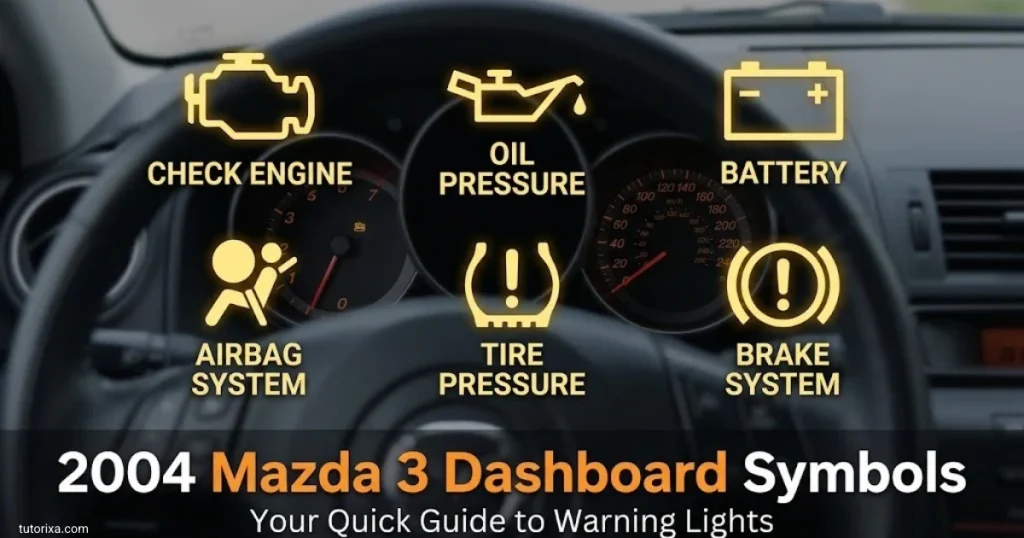
The 2004 Mazda 3 belongs to the first generation. Its dashboard uses relatively straightforward warning lights, including engine, oil pressure, charging system, braking, airbag, and low-fuel indicators.
Common symbols include:
- Oil pressure warning: A red oil-can symbol indicates a possible loss of engine oil pressure. Stop safely and switch off the engine.
- Battery warning: Indicates a possible charging-system problem.
- Check engine light: Signals an engine-management or emissions-related fault.
- ABS warning: Indicates a possible fault in the anti-lock braking system.
- Airbag warning: Suggests a problem with the airbag or seat-belt pretensioner system.
- Low fuel warning: Reminds you to refuel.
- Door-ajar warning: Indicates that a door is not securely closed.
- Automatic transaxle warning: On applicable automatic models, this may indicate a transmission-related fault.
- Tire pressure warning: On equipped versions, it indicates abnormal tire pressure or a monitoring-system issue.
The 2004 owner’s manual specifically covers door-ajar, washer-fluid, automatic-transaxle, and tire-pressure warnings, among others. Equipment can vary by market and configuration.
If a warning appears on a 2004 model, identify its symbol in the original manual rather than relying on a newer Mazda 3 dashboard diagram.
2006 Mazda 3 Dashboard Symbols
The 2006 Mazda 3 shares many basic warning-light functions with the earlier first-generation model. Engine, braking, charging, and occupant-safety indicators remain important when interpreting the dashboard.
Look for these common symbols:
- Red oil can: Possible low engine oil pressure.
- Battery outline: Charging-system warning.
- Engine outline: Check engine warning.
- ABS letters: Anti-lock braking system warning.
- Airbag symbol: Airbag or pretensioner system warning.
- Seat belt symbol: A seat belt needs to be fastened.
- Fuel pump: Low fuel level.
- Open-door symbol: A door is not completely shut.
- Thermometer or temperature warning: Possible engine overheating.
The exact symbols and available tire-pressure or convenience indicators depend on the car’s market and equipment. If the red oil pressure or overheating warning appears while driving, pull over safely and stop the engine rather than continuing to a workshop.
For a transmission warning on an automatic model, arrange an inspection promptly. Do not assume that restarting the vehicle has resolved the underlying problem.
2011 Mazda 3 Dashboard Symbols
The 2011 Mazda 3 is part of the second generation. Its dashboard includes familiar engine and safety warnings, with additional indicators depending on the installed equipment.
| Symbol or indicator | Meaning |
| Check engine | An engine or emissions-related fault has been detected. |
| Oil pressure | Engine oil pressure may be too low. |
| Charging system | The charging system may not be working correctly. |
| ABS | The anti-lock braking system may have a fault. |
| Brake warning | The parking brake may be applied, or a brake-system problem may exist. |
| Airbag warning | A restraint-system fault may need inspection. |
| Tire pressure warning | Available on equipped versions; check the tire pressures and system status. |
| Power steering warning | The steering-assistance system may have a fault. |
| Low fuel | Refueling is needed soon. |
| Automatic transmission warning | An applicable transmission system may have detected a problem. |
The key distinction is between an indicator showing normal operation and a warning signaling a fault. For example, a turn-signal arrow is generally routine, while a persistent brake warning deserves attention.
If the check engine light flashes, avoid hard acceleration and have the vehicle checked promptly. A flashing light can indicate a serious engine misfire.
2012 Mazda 3 Dashboard Symbols And Meanings
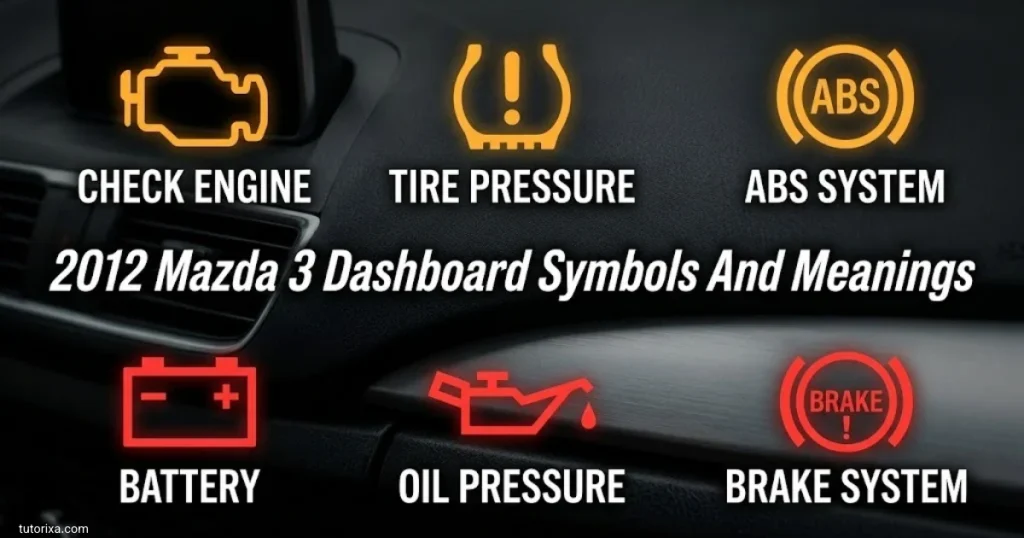
The 2012 Mazda 3 has a dashboard layout that may differ from the 2011 version in display details and installed features. Most essential warning symbols still communicate the same basic types of problems.
- Oil pressure light: Stop safely and shut off the engine if the warning appears while running.
- Check engine light: Arrange a diagnostic scan to determine the cause.
- Battery light: Have the charging system checked.
- ABS light: The anti-lock braking function may be unavailable.
- Brake warning light: Check the parking brake and seek service if the warning remains.
- Tire pressure symbol: Check all tires when cold and use the recommended pressures.
- Airbag light: Have the restraint system inspected.
- Temperature warning: Stop safely if the engine is overheating.
- Wrench or maintenance indicator: Check whether scheduled servicing is due.
- Key or security indicator: Consult the manual if the vehicle does not recognize the key or the warning behaves unexpectedly.
What To Check First On A 2012 Mazda 3
Start by identifying the color and shape of the light. Then read any message shown on the information display.
If the symbol is red and relates to oil pressure, overheating, or brakes, prioritize safety. For an amber warning, check whether the car drives normally and arrange the appropriate inspection. The exact instructions in the 2012 owner’s manual take priority over a general warning-light guide.
2013 Mazda 3 Dashboard Symbols
The 2013 Mazda 3 continues the second-generation dashboard design. The main warning symbols cover engine health, braking, vehicle stability, tire pressure where fitted, and occupant safety.
Common dashboard indicators include:
- Engine outline: A fault has been detected in the engine-management or emissions system.
- Oil can: Possible low oil pressure.
- Battery: Charging-system warning.
- ABS: Anti-lock braking system fault.
- Brake circle: Parking brake or brake-system warning.
- Airbag: Restraint-system warning.
- Tire with exclamation mark: Tire-pressure or tire-pressure monitoring warning on equipped vehicles.
- Skidding car: Traction or stability control is operating or may have a fault.
- Fuel pump: Low fuel.
- Seat belt: A seat belt needs to be fastened.
- Door symbol: A door or applicable rear opening is not securely closed.
A traction-control light that flashes briefly may indicate that the system is correcting wheel slip. If it stays on continuously, consult the manual to determine whether the system has been switched off or has detected a fault.
Avoid diagnosing a fault from a single symbol alone. A diagnostic scan may be necessary to identify the actual cause of an engine or electronic-system warning.
2015 Mazda 3 Dashboard Symbols
The 2015 Mazda 3 is part of the third generation and uses a more modern collection of dashboard displays and electronic-system indicators. Depending on the trim, you may see additional symbols for driver-assistance and convenience features.
| Dashboard indicator | Meaning |
| Engine warning | Possible engine-management or emissions fault. |
| Oil pressure warning | Possible low engine oil pressure. |
| Charging warning | Possible battery-charging system fault. |
| Brake warning | Parking brake or braking-system alert. |
| ABS | Possible anti-lock braking system fault. |
| Tire pressure warning | Low pressure or a monitoring-system fault, depending on the warning behavior. |
| Power steering warning | Possible electric power steering problem. |
| Key warning | Possible keyless-entry or key-detection issue. |
| Lane departure warning | Lane monitoring status or a related system warning, if equipped. |
| High-beam control warning | A fault or limitation in the automatic high-beam system, if equipped. |
| Smart brake support or collision-related warning | Driver-assistance system status or a detected problem, depending on the display. |
| Wrench indicator | Maintenance reminder. |
Why A Warning May Appear Temporarily
Some electronic systems can be unavailable under certain conditions or may display a warning during startup. A temporary indicator does not always mean a component has failed.
However, if the light remains on, flashes repeatedly, or appears with a warning message, follow the owner’s manual. Never assume a safety-related feature is working simply because the car continues to drive normally.
2016 Mazda 3 Dashboard Symbols And Meanings
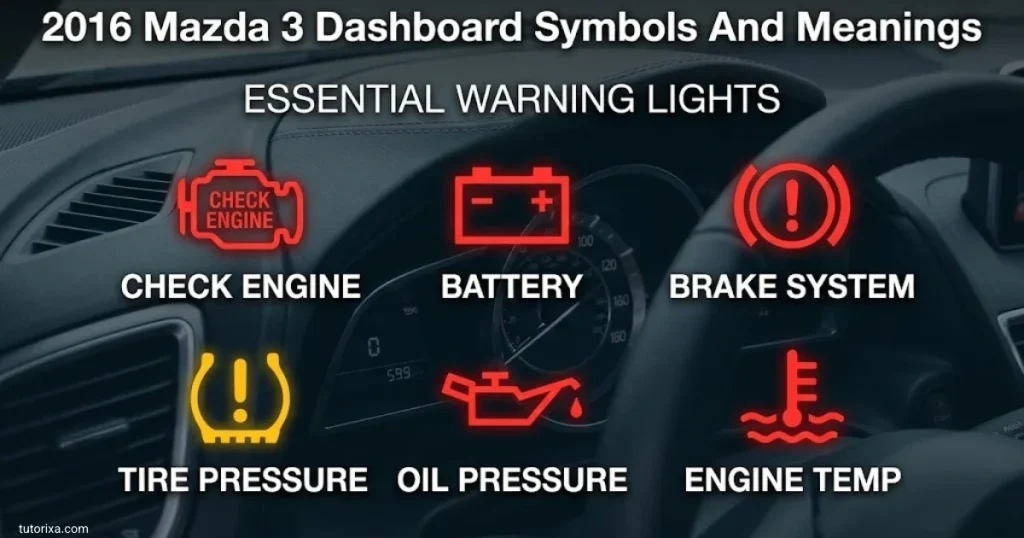
The 2016 Mazda 3 uses many of the same warning symbols as the 2015 model. Some versions include additional indicators for radar-based cruise control, lane assistance, or automatic braking features.
Here are several indicators worth recognizing:
- Master warning light: Alerts you to a condition that may need further explanation on the information display.
- Smart Brake Support or Smart City Brake Support warning: May indicate a system limitation or malfunction, depending on the symbol and message.
- Lane departure warning: Relates to the lane monitoring system when fitted.
- Blind-spot monitoring indicator: Shows a detected vehicle in a monitored blind spot or the status of the system, depending on its location and behavior.
- Radar cruise control warning: May indicate that the system is unavailable or requires attention.
- Check engine light: Requires investigation of an engine-management or emissions issue.
- Brake system warning: Needs attention if it remains illuminated after the parking brake is released.
- Tire pressure warning: Calls for a pressure check and further inspection if the warning persists.
The distinction between a system-status indicator and a malfunction warning is especially important for driver-assistance features. A disabled or unavailable feature may not provide its usual assistance, so drive accordingly.
For exact meanings, match the symbol with the 2016 owner’s manual and the message shown on your car’s display.
2017 Mazda 3 Dashboard Symbols And Meanings
The 2017 Mazda 3 has a similar overall dashboard system to nearby model years, although equipment and display layouts vary by trim and market.
Important symbols include the following:
| Symbol | Meaning | Suggested action |
| Red oil can | Possible low oil pressure | Stop safely and switch off the engine. |
| Red battery | Charging-system problem | Stop safely and arrange assistance if necessary. |
| Amber engine | Engine or emissions fault | Arrange a diagnostic check. |
| ABS | Anti-lock braking system warning | Drive cautiously if normal braking remains, and seek service. |
| Brake warning | Parking brake or braking-system issue | Check the parking brake; stop if braking seems abnormal. |
| Tire-shaped ! | Tire pressure or monitoring warning | Check pressures and follow the manual. |
| Airbag symbol | Restraint-system fault | Have the system inspected. |
| Wrench | Maintenance reminder | Check the maintenance schedule. |
| Skidding car | Stability or traction control | A flashing light may indicate intervention; a persistent warning needs checking. |
| Key symbol | Key-detection or keyless-system warning | Check the key and consult the manual. |
Understanding Electronic Safety Warnings
If a lane-monitoring, collision-prevention, or radar-cruise indicator appears, determine whether it indicates normal operation, temporary unavailability, or a malfunction.
Weather, road conditions, sensor obstruction, and system faults can affect driver-assistance functions. Clean accessible sensors only as instructed in the manual, and do not rely on assistance features as a replacement for attentive driving.
2018 Mazda 3 Dashboard Symbols And Meanings
The 2018 Mazda 3 includes standard mechanical warnings and, on equipped versions, indicators for more advanced electronic systems.
Mazda’s official 2018 manual lists warnings for the brake system, ABS, charging system, engine oil, coolant temperature, power steering, check engine, airbags, tire pressure, and other systems. Some indicators are available only on certain models.
Common symbols include:
- Brake system warning: Indicates that the parking brake may be applied or a brake-system issue may exist.
- ABS warning: Signals a possible fault in the anti-lock braking system.
- Charging system warning: Indicates a possible charging fault.
- Engine oil warning: May signal low engine oil pressure.
- Coolant temperature warning: Alerts you to possible overheating.
- Power steering warning: Indicates a possible steering-assistance problem.
- Check engine light: Signals an engine or emissions-related fault.
- Airbag warning: Indicates a potential problem with the airbag or seat-belt pretensioner system.
- Tire pressure warning: Indicates a pressure issue or monitoring-system malfunction.
- KEY warning: May indicate a problem with the key or keyless-entry system.
- Low fuel warning: Indicates that the fuel level is low.
- LED headlight or driver-assistance warning: May indicate a fault in an equipped system.
Where To Find More Information
Some 2018 Mazda 3 versions can display further warning information through the vehicle’s center display. Where supported, use the vehicle-status or warning-guidance feature to read the message.
The official 2018 Mazda 3 owner’s manual is a useful reference for matching warning and indicator lights to the correct instructions.
2019 Mazda 3 Dashboard Symbols
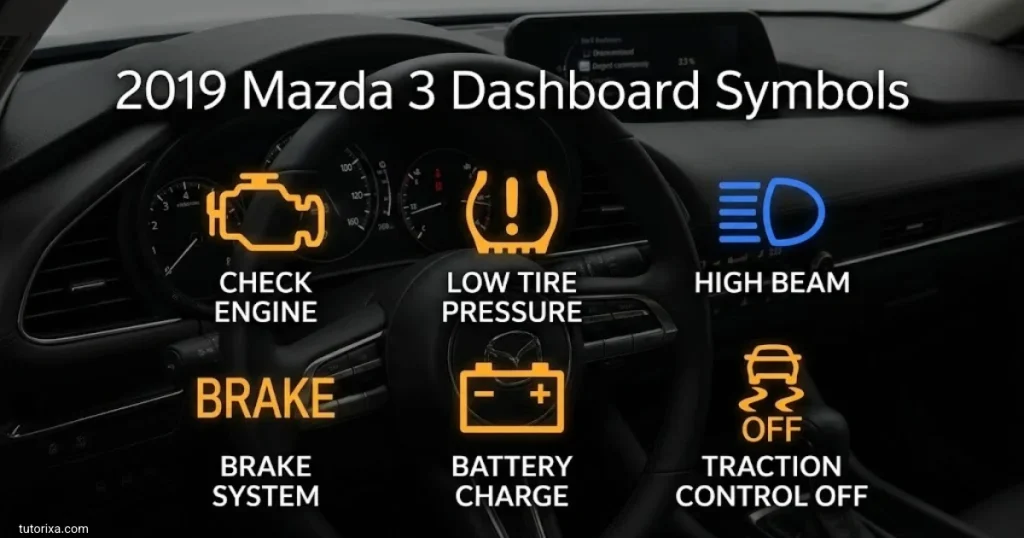
The 2019 Mazda 3 includes an instrument cluster and information display that can show warnings, system status, and driving information. Its available equipment differs by trim and market, so not every vehicle will have every symbol.
The main dashboard symbols include:
- Brake system warning: Indicates a parking-brake status or possible brake-system problem.
- ABS warning: Signals a possible anti-lock braking system fault.
- Charging system warning: Indicates a possible problem with the charging system.
- Engine oil warning: Warns of a possible low oil pressure condition.
- Coolant temperature warning: Alerts you to possible engine overheating.
- Power steering warning: Indicates a possible steering-assistance fault.
- Master warning: Directs your attention to a warning or message that needs checking.
- Check engine light: Indicates an engine-management or emissions-related problem.
- Airbag warning: Signals a possible restraint-system fault.
- Tire pressure warning: Indicates low pressure or a monitoring-system issue.
- KEY warning: May relate to key recognition or the keyless-entry system.
- Low fuel warning: Indicates that refueling is needed.
- Driver-assistance warnings: On equipped versions, these may relate to lane monitoring, automatic braking, or other assistance features.
Reading Messages In The 2019 Instrument Cluster
The information display may show more detail than the warning symbol alone. Mazda’s official manual explains that warning messages can indicate system status, a malfunction, or an abnormal condition. If a symbol appears with a message, use both to identify the appropriate action.
For the correct procedure, consult the official 2019 Mazda 3 owner’s manual. If a critical warning appears, follow its safety instructions instead of continuing to drive in order to investigate the display.
Frequently Asked Questions
What Is The Most Serious Warning Light On A Mazda 3?
A red oil pressure warning, an overheating warning, or a serious brake-system warning can indicate a condition that requires immediate action. Stop safely and follow the owner’s manual. Do not continue driving with a critical warning.
What Does The Orange Engine Symbol Mean On A Mazda 3?
The orange engine-shaped symbol is the check engine light. It indicates a fault in the engine-management or emissions system. A steady light generally calls for a diagnostic check, while a flashing light can indicate a more urgent problem.
Why Does My Mazda 3 Have A Tire Symbol With An Exclamation Mark?
This symbol usually relates to the tire pressure monitoring system. Check all tires when cold and inflate them to the recommended pressures. If the light flashes or stays on after correcting the pressure, the monitoring system may need inspection.
Why Do Mazda 3 Dashboard Lights Come On When I Start The Car?
Many warning and indicator lights illuminate briefly during startup as part of a system check. They should normally go out after the check is complete or the engine starts. A light that remains on or returns while driving may indicate a fault.
Where Can I Find The Correct Mazda 3 Dashboard Symbols For My Year?
Check the owner’s manual for your exact model year, trim, and market. Mazda’s official manuals explain the warning and indicator lights, including the actions recommended for specific warnings. Do not rely solely on a diagram from another model year.
Conclusion
Understanding Mazda 3 dashboard symbols helps you recognize normal indicators and identify potential vehicle problems. Warning lights for oil pressure, engine temperature, brakes, and charging systems deserve particular attention because ignoring them can lead to safety risks or expensive damage.
The dashboard can differ between the 2004, 2006, 2011, 2012, 2013, 2015, 2016, 2017, 2018, and 2019 models. Always match the symbol and its behavior to the correct owner’s manual, especially when the vehicle has additional driver-assistance features.
If a warning appears, check its color, shape, and accompanying message before deciding what to do. Stop safely when a critical warning requires it, and arrange a professional inspection when the cause is unclear. Understanding the symbol is the first step; addressing the underlying problem is what keeps your Mazda 3 safe and reliable.

I’m Ellis Montgomery, a British writer interested in the powerful language of symbols. I explore everything from traditional emblems and cultural signs to contemporary symbols found in modern life. My aim is to explain their meanings clearly while revealing the stories and ideas behind them, making symbolism fascinating and accessible to everyone.
Books:
- The Complete Book of Symbols
- Hidden Messages in Everyday Symbols
 Rowan Whitaker
 Freddie Beaumont